Skip to content
Menu Link Logo
Official Documentation

The Complete Menu Link User Guide

Master every tool on the Menu Link platform with step-by-step visual walkthroughs, real live screenshots, and practical tips for busy restaurant and hospitality teams.

14
Feature Guides
0s
Real-Time Sync
100%
App-Free Diners
Print
Ready Studio
1
Getting Started

Dashboard & Menu Management

What It Does

The Menu Link Dashboard is your venue's central command station. It gives you a clean, unified view of all your digital menus, active QR codes, live view analytics, and customer interaction metrics.

From your dashboard, you can publish or unpublish menus with one click, launch the interactive live editor, jump straight into Quick 86 service mode, and monitor diner feedback.

How to Use It

  1. Access Your Menus: Log in to your account and click My Menus in the sidebar.
  2. Status Badges: Check whether each menu is Published (live to the public) or in Draft mode.
  3. Fast Action Buttons: Use the ✏️ Edit button for full design edits or ⚡ Quick 86 for shift adjustments.
  4. Tools Dropdown: Click ••• More on any menu card to access Bulk Pricing, CSV tools, Table Tents, Embed snippets, and Duplicate menu.
Menu Link — My Menus Dashboard Click to expand
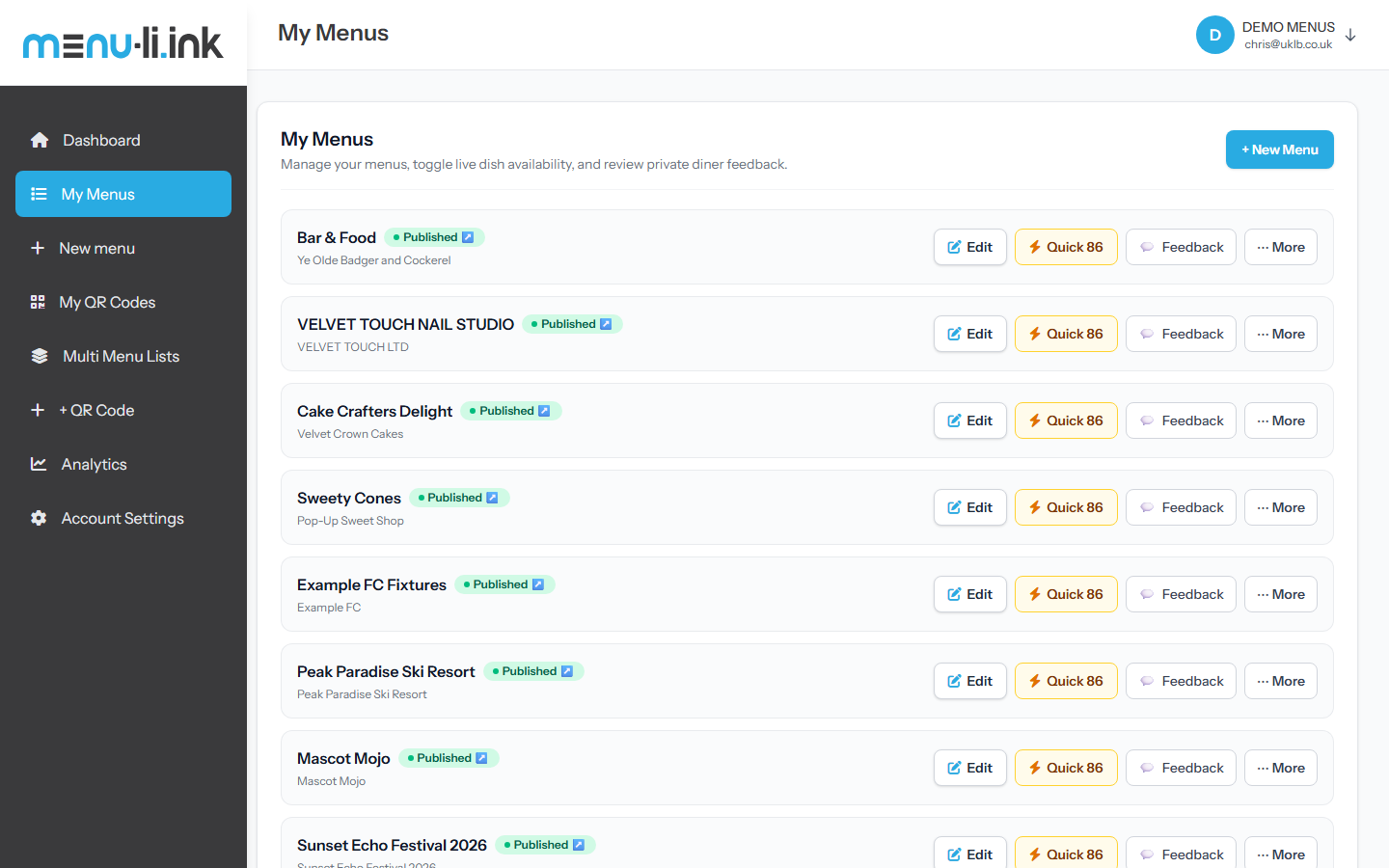
Menu Link My Menus Dashboard View
Pro Tip: Multi-Menu Venues: You can create multiple menus under one business profile—e.g. Main Food Menu, Wine & Cocktails List, Sunday Roast, and Kids Menu. Diners can switch between them seamlessly.
3
Dish Details

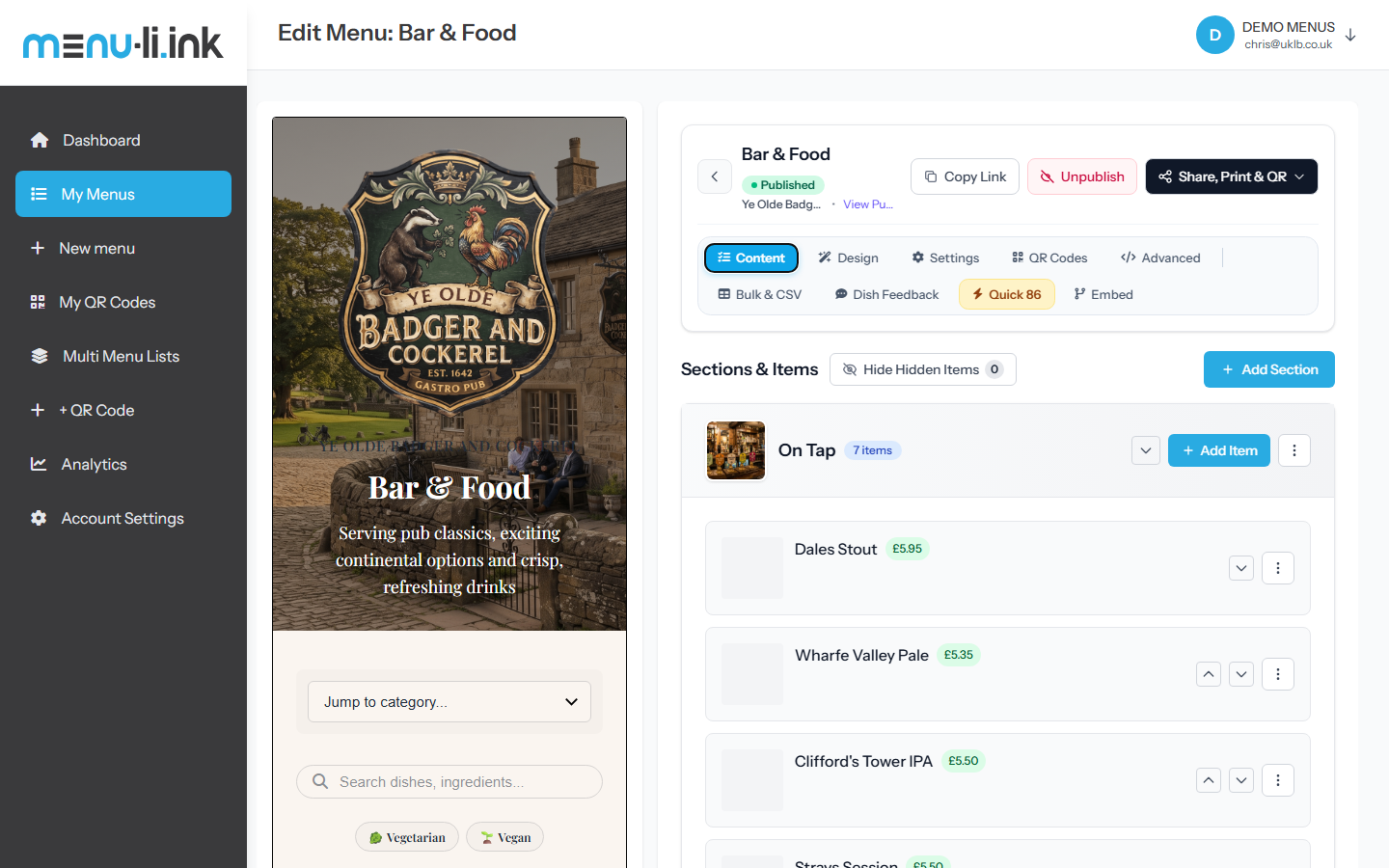
Rich Dish Details, Allergens & Multi-Pricing

Menu Link gives you hospitality-grade detail controls for every single dish, snack, and beverage. You aren't limited to a simple title and single price.

Multi-Option Pricing

Define portion tiers like Pint: £5.50 | Half: £3.00 or Regular: £12.50 | Large: £16.00 with custom labels.

Dietary Tags & Badges

Tag dishes with Vegetarian, Vegan, Gluten-Free, Halal, or Dairy-Free badges for instant diner filtering.

14 UK/EU Allergens

Full compliance with standard food allergen legislation. Tag Celery, Crustaceans, Eggs, Fish, Milk, Mustard, Nuts, Peanuts, Soya, Sulphites, etc.

Spice Levels & Prep Times

Show 1–3 chili spice indicators (Mild, Medium, Hot, Extra Hot) and preparation time estimates (e.g., "15–20 mins").

Chef's Specials & Availability Notes

Flag items with a glowing "Featured" star badge, or add operational notes like "Available Friday & Saturday only".

4
Time Saver

Bulk Price & Item Editor + Smart Rounding

What It Does

Gone are the days of opening 50 individual modal windows just to adjust prices for inflation or seasonal ingredients.

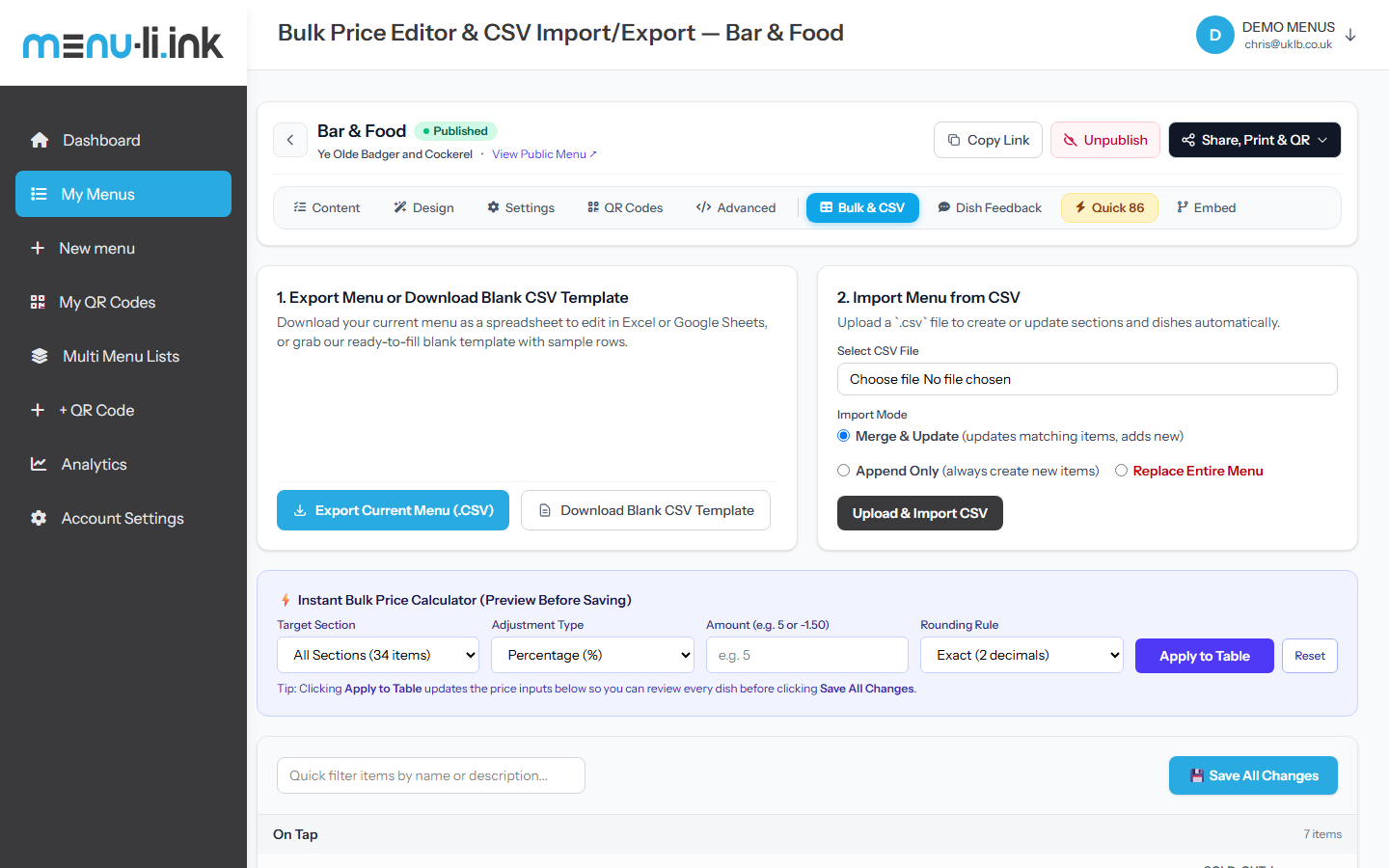
The Bulk Price & Item Editor loads your entire menu in an Excel-style spreadsheet interface. You can edit dish titles, descriptions, prices, availability, and featured badges all on one screen.

Even better: the Instant Bulk Price Calculator lets you apply price increases (or happy hour discounts) across an entire section or the entire menu at once!

How to Use the Smart Price Calculator

  1. Navigate to your menu and select the 📊 Bulk & CSV tab.
  2. In the Instant Bulk Price Calculator, pick your Target Section (or "All Sections").
  3. Select Adjustment Type: Percentage (%) or Flat Amount (+/-).
  4. Enter the amount (e.g. 5 for +5% or 0.50 for +50p).
  5. Choose a Rounding Rule: Exact (2 decimals), Nearest .95, Nearest .99, or Nearest 0.10.
  6. Click Apply to Table. Review the newly calculated prices in the table, then hit Save All Changes.
Bulk Price Editor, Smart Price Calculator & Item Spreadsheet Click to expand
Bulk Price Editor and Smart Price Calculator
5
Data Flexibility

CSV Import, Export & Template Studio

Seamlessly import menus from existing systems or back up your entire menu to a spreadsheet anytime. Menu Link provides dedicated CSV endpoints with full UTF-8 BOM encoding so pound symbols (£), euro symbols (€), and foreign culinary accents (like Crème Brûlée or Tagliolini) open cleanly in Microsoft Excel.

1. Export Current Menu

Click Export Current Menu (.CSV) to immediately download all sections, titles, prices, descriptions, allergen lists, and portion options.

2. Blank CSV Template

Starting a new venue? Download the pre-formatted template with verified header columns and 2 sample rows showing single prices and multi-tier options.

3. Smart Import Modes

Choose from 3 modes: Merge & Update (matches existing dishes and creates new ones), Append Only, or Replace Entire Menu.

6
Live Service Operation

Mobile "Quick 86" Mode (Sold-Out Toggles)

What It Does

In restaurant jargon, "86" means an item is out of stock. During dinner rush, front-of-house staff or head chefs do not want to navigate through complex settings just to mark the sea bass as sold out.

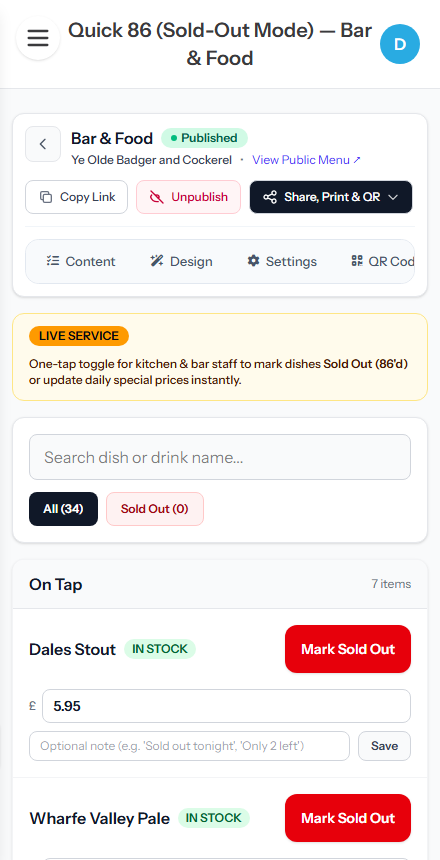
Quick 86 is a dedicated mobile-first interface designed to be kept open on kitchen tablets or staff smartphones. It provides instant 1-tap toggling of item availability without reloading the page.

How to Use It During Service

  1. From your dashboard or menu bar, tap the ⚡ Quick 86 button.
  2. Search for any dish or drink using the instant keyword filter at the top.
  3. Tap Mark Sold Out. The item turns red and is immediately crossed out on the public menu for diners in real time.
  4. Optionally add a note (e.g. "Sold out tonight" or "Catch of the day sold").
  5. When your prep is restocked next morning, tap Mark In Stock with one touch.
Mobile Quick 86 (Sold-Out & Shift Mode) Click to expand
Mobile Quick 86 Live Service Mode
7
Print Studio

Printable Table Tents, Coasters & Poster Studio

What It Does

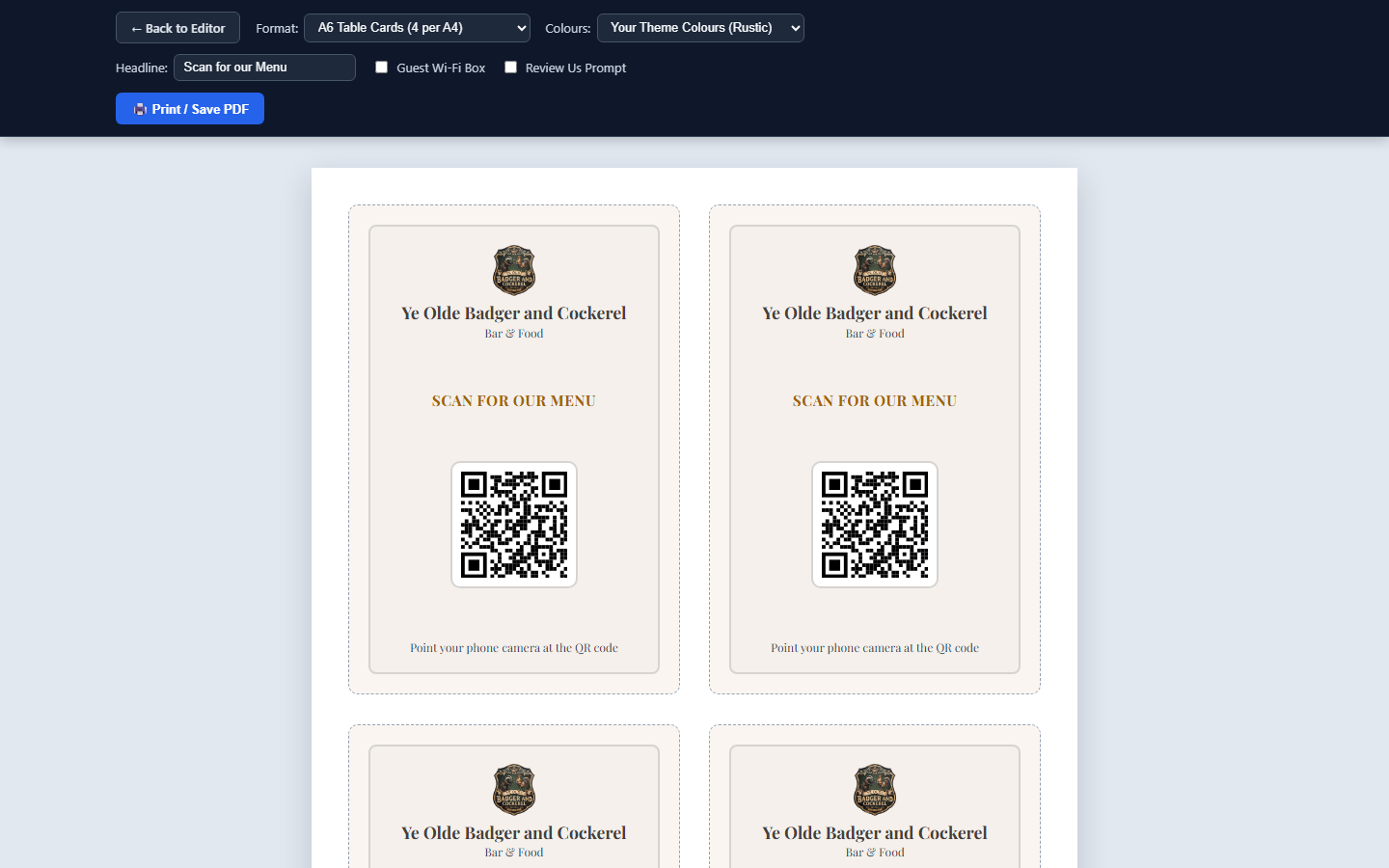
Save hundreds of pounds on graphic design agencies. The Print Studio automatically pulls your menu's chosen fonts, colors, venue logo, and high-resolution QR code into print-ready table collateral.

Features built-in cut lines and fold indicators formatted for standard A4 paper and cardstock.

Available Formats & Customization

  • ✓ A6 Foldable Table Tents: 2 per A4 sheet with fold lines for standing triangular cards.
  • ✓ Square Table Talkers / Coasters: 4 per A4 sheet with crop marks.
  • ✓ A4 Window / Wall Poster: 1 full-page poster for your venue entrance or bar counter.
  • ✓ Ink Saver Mode: Switch from full theme background to a crisp white paper background for standard office printing.
  • ✓ Guest Wi-Fi Box: Automatically print your venue Wi-Fi network and password right below the QR code.
Printable QR Table Tents, Coasters & Standee Studio Click to expand
Printable Table Tents and Coaster Studio
8
Guest Experience

The Diner Experience & Public Menu

What Diners See

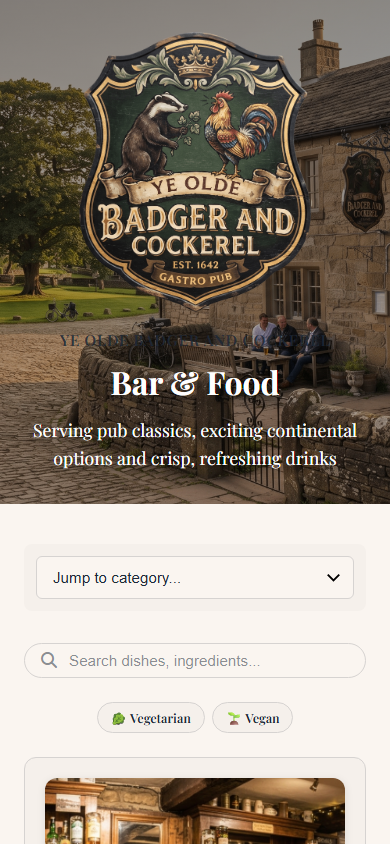
When guests scan your QR code with their camera, your digital menu loads in less than a second in their native browser (Safari, Chrome, etc.). No app download or account creation is ever required.

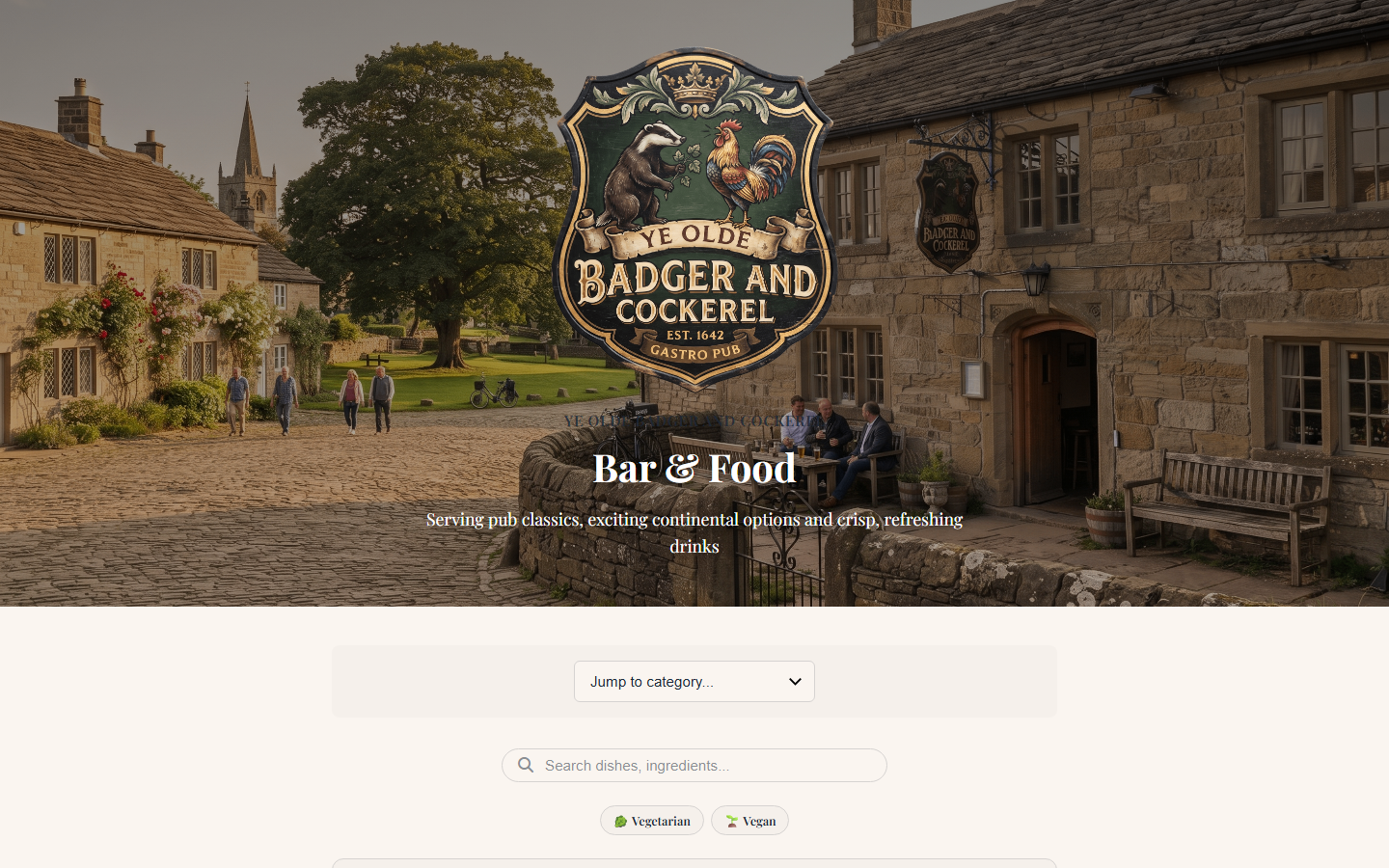
Diners enjoy crisp imagery, quick category jump dropdowns, live keyword search, and interactive dietary filter pills. Tapping any dish opens an expanded photo modal with ingredients and allergen declarations.

Time-Based Scheduled Menus

Set specific sections (like Lunch Menu (12–3pm), Happy Hour (5–7pm), or Sunday Roast) to appear automatically only on matching days and hours.

You can choose between two modes: Show Schedule Badge (shows the dishes with an informative schedule note) or Auto-Hide Outside Hours (keeps the menu uncluttered).

Desktop Public View with Themed Backdrop & Filters
Public Themed Digital Menu View
Mobile Diner View
Mobile Diner Digital Menu View
9
Diner Favourites

Diner Shortlist & Running Total Drawer

Diners love browsing through menus, but often forget what they decided on when the waiter arrives at the table.

Menu Link includes a built-in "❤️ My Shortlist" feature. As guests browse your dishes and drinks, they can tap the heart icon on any item. A floating pill button appears at the bottom of their screen: ❤️ My Shortlist (3) — £34.50.

Tapping the pill opens a slide-over drawer showing their shortlisted dishes and estimated total. Guests can read their choices directly to your server without any awkward back-and-forth scrolling.

10
Reputation Protection

Private Diner Dish Feedback & Reviews Inbox

Why It Matters

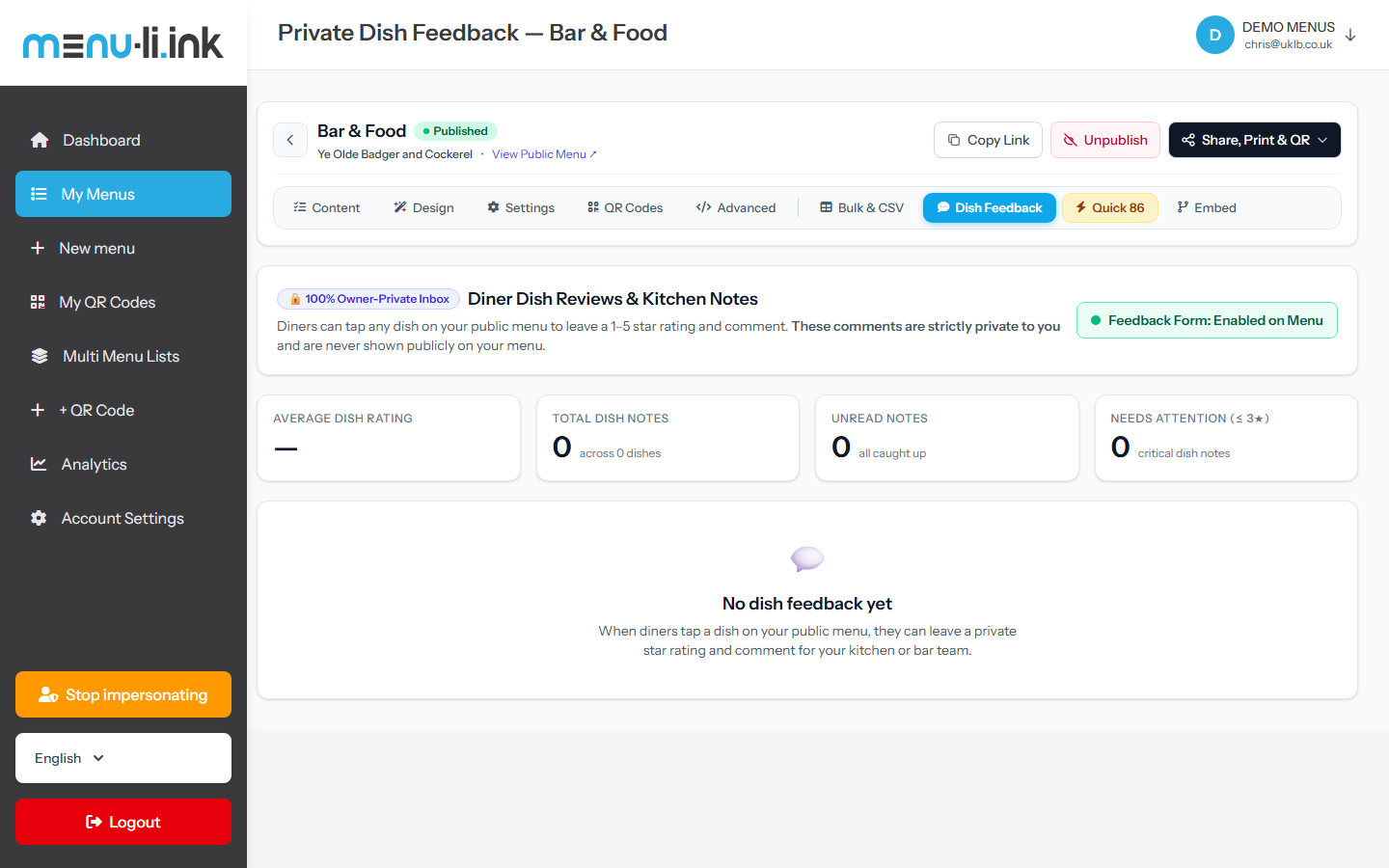
Nothing hurts a restaurant more than a 1-star Google or TripAdvisor review over a minor issue (e.g. "Steak was overcooked" or "Soup needed salt") that your kitchen could have easily resolved on the spot.

Menu Link solves this with 100% Owner-Only Private Dish Feedback. Inside the dish detail popup on your digital menu, diners can tap a 1–5 star rating and type a private note directly to the chef.

✓ These notes are strictly private to you. They are never published on the public menu.

Owner Feedback Inbox Features

  • ★ Average Dish Rating: Live overall score across all customer reviews.
  • ⚠ Needs Attention Filter: Instantly isolate any feedback with 3 stars or lower to identify problem dishes.
  • 🏷 Dish Grouping: Filter reviews by specific menu items to see customer reactions to new seasonal specials.
  • 🛡 Honeypot Spam Protection & Rate Limiting: Automated protection prevents spam submissions.
Owner Private Dish Feedback & Kitchen Review Inbox Click to expand
Owner Private Dish Feedback Inbox
11
Integrations

Website Embeds & Live Floating Widgets

What It Does

Keep your website menu always up-to-date without ever editing HTML or uploading cumbersome PDFs that are impossible to read on smartphones.

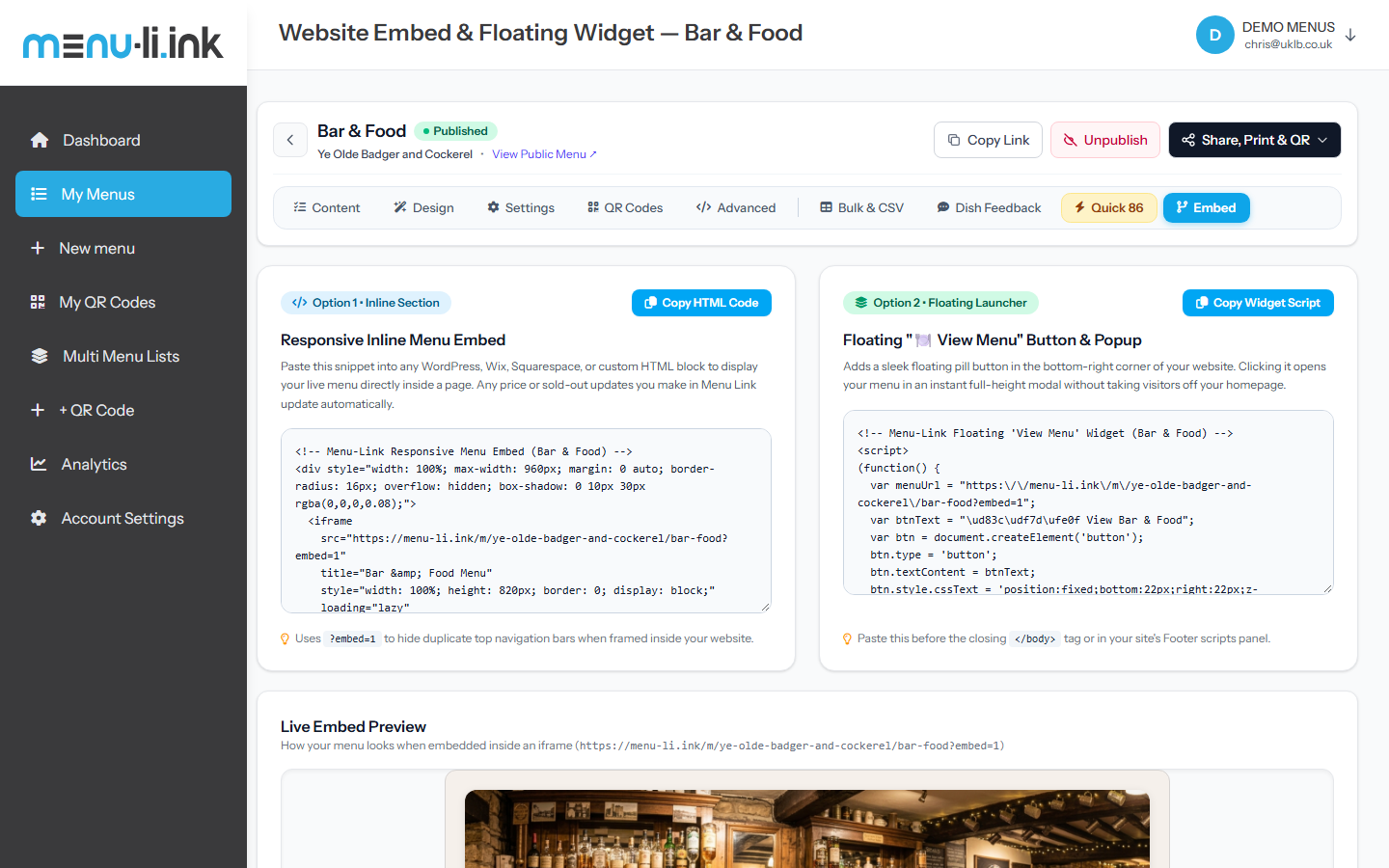
The Website Embed Generator provides copy-paste code snippets for any WordPress, Squarespace, Wix, Shopify, or custom website. Whenever you update a price or 86 a dish in Menu Link, your website menu updates in real time automatically.

Two Embed Modes Available

Option 1: Responsive Inline Iframe

Embeds directly inside your webpage. Clean borderless layout with auto-height and ?embed=1 clean presentation.

Option 2: Floating "View Menu" Button + Modal

A floating pill in the bottom corner of your site that opens an instant full-screen slide-over menu without taking users away.

Website Embed Generator & Code Studio Click to expand
Website Embed Generator and Code Studio
12
Branded Codes

Custom QR Code Studio & Dynamic Redirects

The Power of Dynamic QR Codes

Traditional QR codes encode a fixed web link directly into the black and white pixel grid. If you ever change web addresses or launch a new menu, those printed codes become useless.

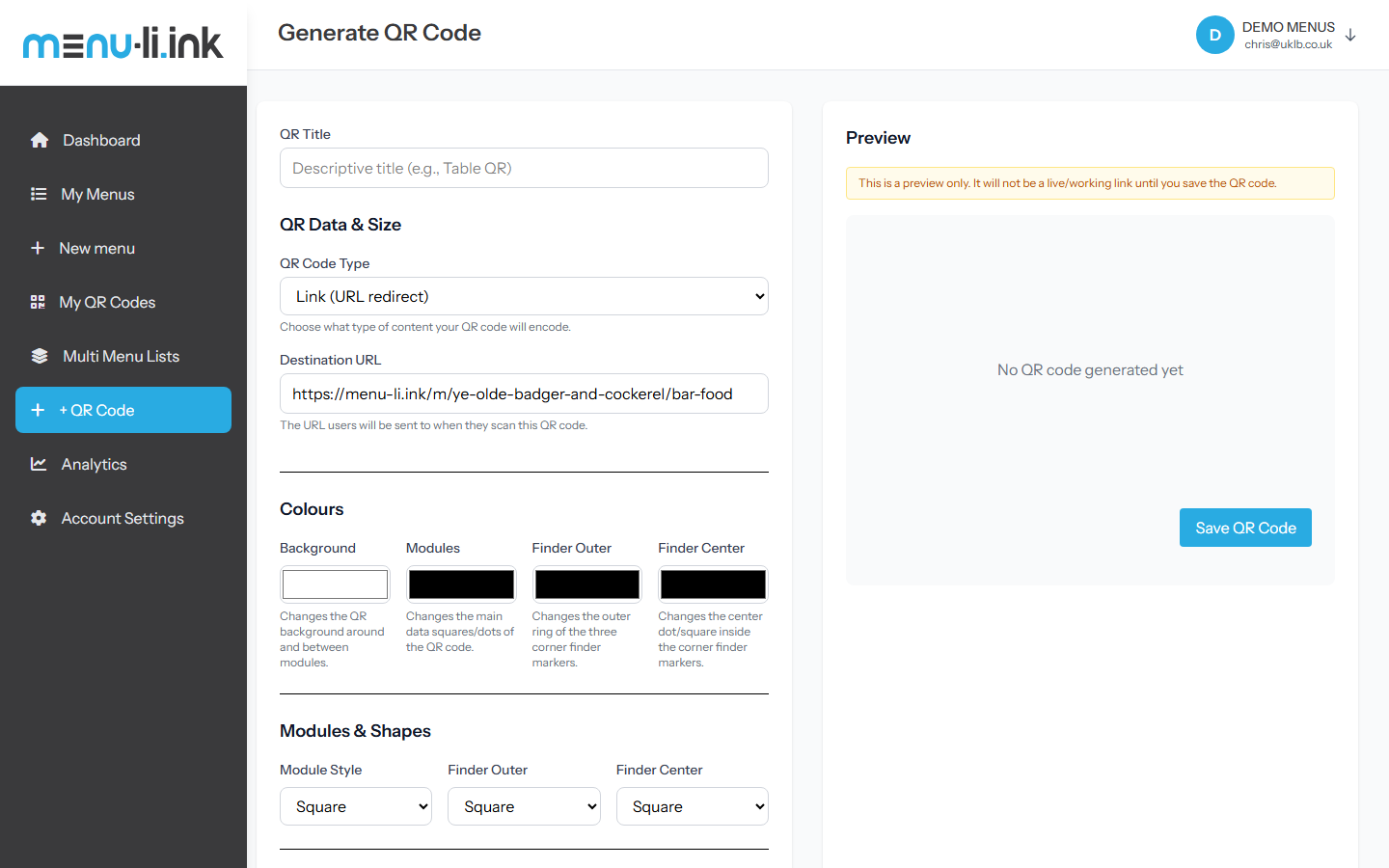
Menu Link QR codes are Dynamic. They point to a smart short redirection link (e.g. https://menu-li.ink/r/XXXXX). You can change the target URL, redirect to a seasonal menu, or link to a holiday promotion at any time without ever reprinting your acrylic stands or table talkers.

Customization Options

  • ● Module Styles: Square, Circle, Squircle, Diamond, Bar-Vertical, Bar-Horizontal.
  • ● Finder Eye Markers: Customize the outer and inner corner markers independently with matching brand colors.
  • ● Linear & Radial Gradients: Blend your brand colors across the QR modules seamlessly.
  • ● High-Resolution Vector Downloads: Download print-ready SVG or PNG files for commercial print shops.
Custom QR Code Studio & Vector Generator Click to expand
Custom QR Code Generator Studio
13
Actionable Data

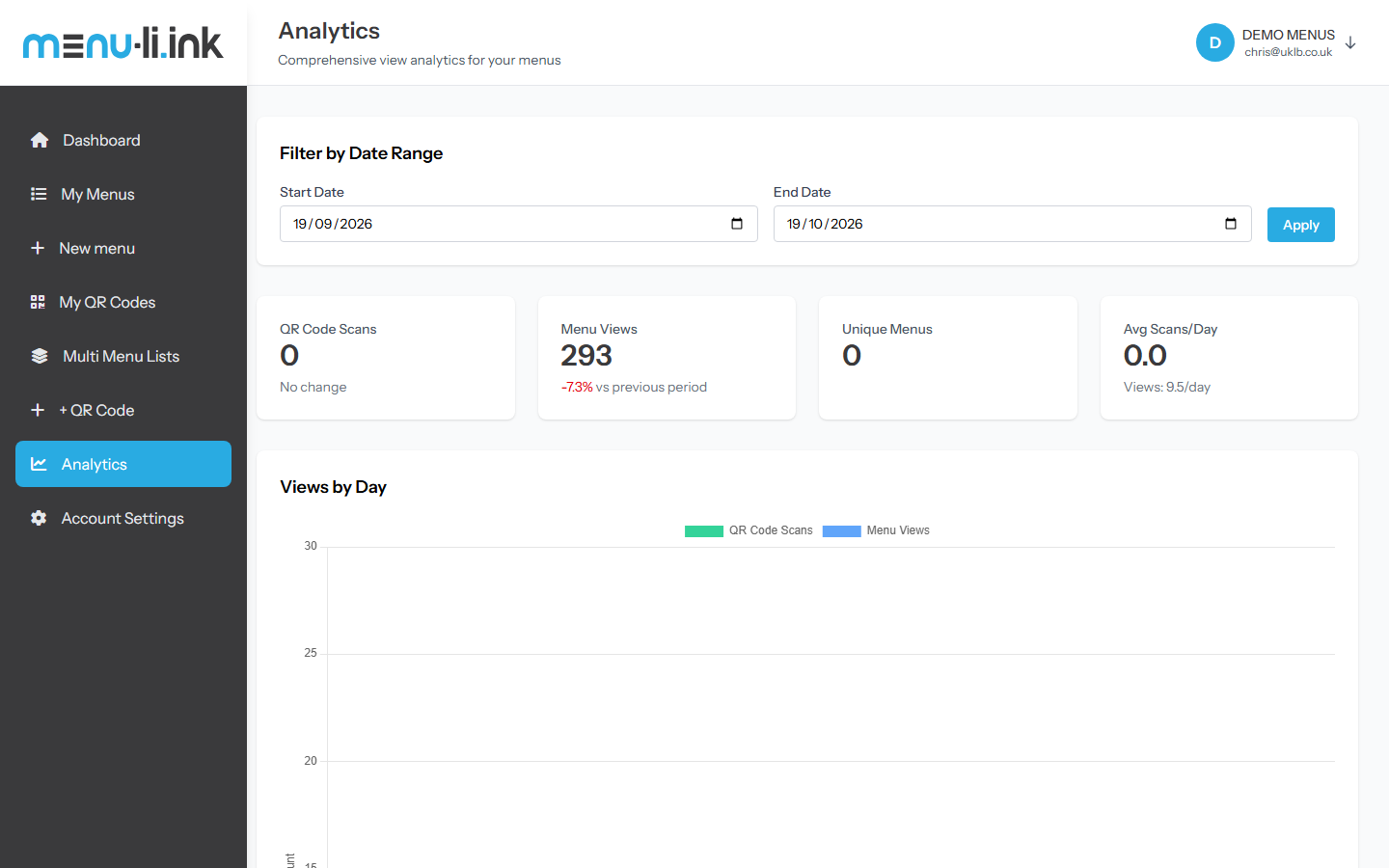
Engagement Analytics & Interaction Tracking

Track What Matters

Know what your customers are looking at before they even order. Menu Link tracks:

  • 📊 Total & Unique Scans: How many times your physical QR codes are scanned every day.
  • 🍽️ Dish Modal Clicks: Which dishes get opened and viewed most frequently.
  • 🌱 Dietary Filter Usage: Discover how many of your guests are actively filtering for Vegan, Gluten-Free, or Halal options.
  • ⏰ Peak Traffic Hours: Spot your busiest dining windows by day and time.

Privacy-First Architecture

All Menu Link analytics are fully GDPR-compliant and privacy-first. We do not track personal identifying information (PII) or build creepy advertising profiles. You get clean, aggregated hospitality insights.

Menu Link Engagement Analytics Dashboard Click to expand
Engagement Analytics Dashboard
14
Local SEO

Public Restaurant & Business Directory

Automatic Local Search Discovery

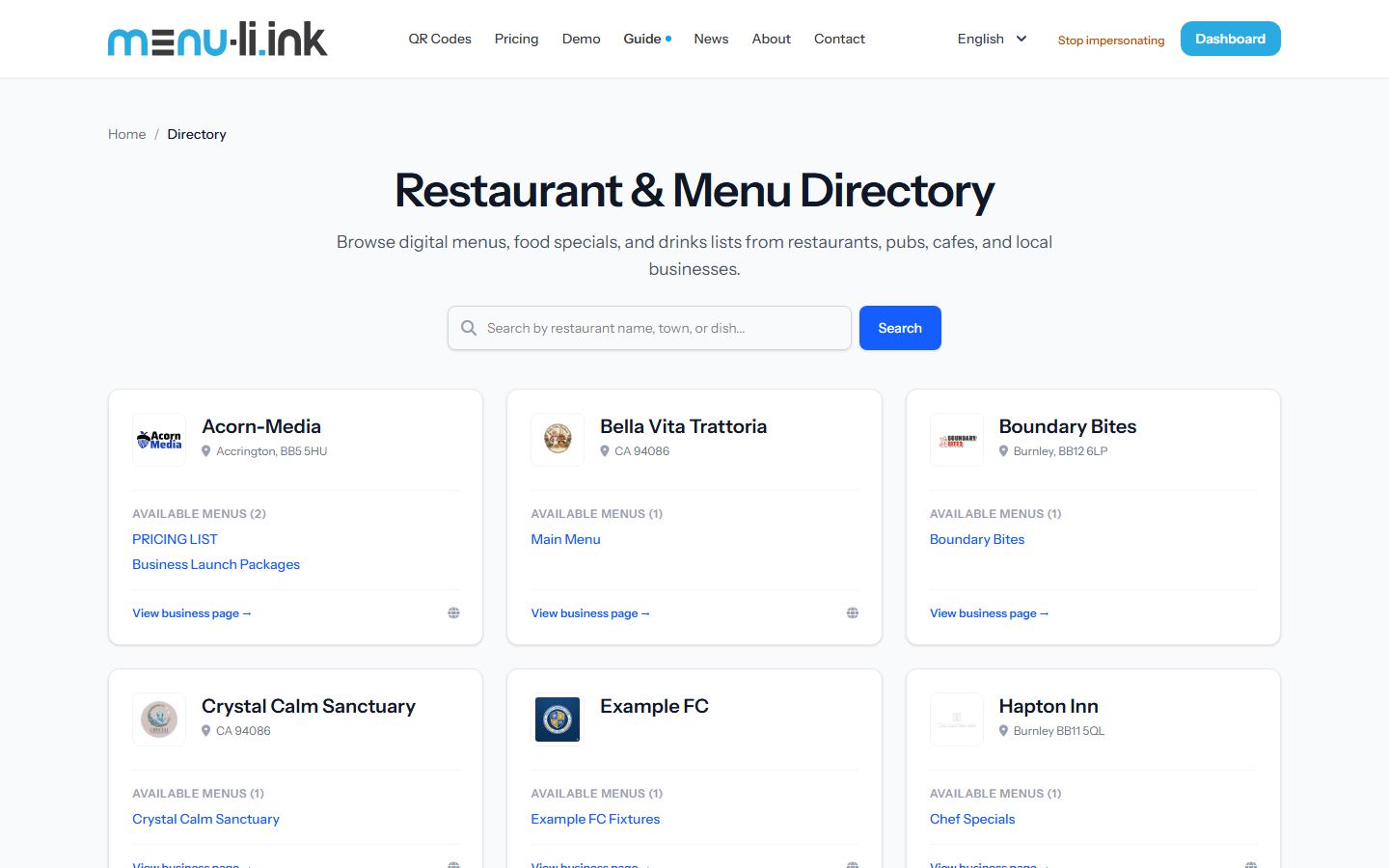
When you publish a menu on Menu Link, your venue is automatically featured in the public Restaurant & Menu Directory at /directory.

Diners and tourists in your area can browse venues by location, town, cuisine, and dish names, helping you attract new footfall directly from organic search.

Canonical Business Profiles

Every venue receives a dedicated business hub URL (e.g. /business/ye-olde-badger-and-cockerel). This hub lists your address, phone, opening hours, social profiles, and all your current published menus in one beautiful place.

Public Restaurant & Business Menu Directory Click to expand
Public Restaurant and Menu Directory

Ready to Upgrade Your Venue's Menu Experience?

Join restaurants, bars, cafes, and hospitality businesses saving money on print costs while giving diners an unforgettable modern digital menu experience.

No credit card required to explore • Instant setup in under 5 minutes